Can't modify message delivery restrictions properties on Exchange 2010 EMC


In my case there was a distribution group with defined message delivery restrictions. That distribution group could accept messages only from senders defined in list box. And, when I tried to modify the list of users I was receiving following error message :
"Set-DistributionGroup Failed: Error: Couldn't find object "domain/local/disabled users/user who is no longer in company." 
The disabled user was not on the list presented by Exchange 2010 EMC, so I can't remove it from the console.
Resolution for this problem can be done by Exchage 2007 EMC (you can see the disabled user in message delivery restriction's dialog list box) if you are in migration period from Exchange 2007, or using Active Directory Users and Computers console from Windows Server 2008 or ADSIEdit. From properties of "problematic" distribution group using attribute editor tab (aduc console), there is authOrig attribute value populated with users that can send email messages to that group. In authOrig attribute value you can see and remove the disabled account. After removing the disabled user you can modify message delivery restrictions properties using Exchange 2010 EMC.

How to request SAN certificate using mmc

You can use certificate mmc console to request SAN certificate for your web server (server authentication). After you have add snap-in for certificates for your local computer store, you can create custom request :


Certificate enrolment wizard will start. On Before You Begin page click Next and on Select Certificate Enrollment Policy select Custom Request (Proceed without enrollment policy) and Next.


On Custom Request page for Template options select (No template) Legacy key :


On Certificate Information click Details and click Properties :


enter friendly name for the certificate :


On Subject tab add desired common name and alternate names for certificate :


Some Public CAs require some additional information in certificate request, like Country:


On Extensions tab add Server authentication for application policies :


On Private Key tab select key options and key type :


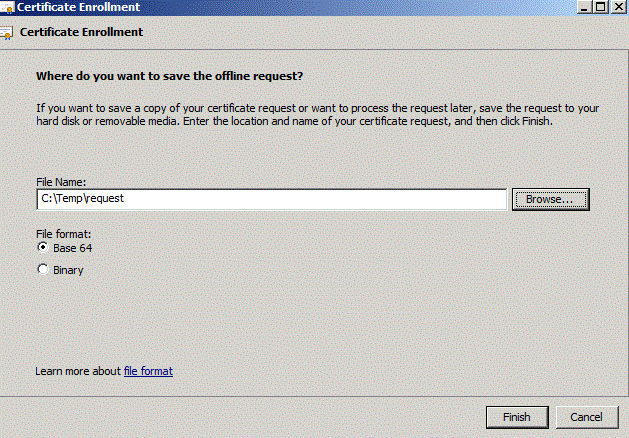
Click OK to go back to wizard page and click Next to save the request to file :


After finishing wizard, you will have certificate request in BASE 64 format, and you can make a request to external or internal certificate authority. After processing your request, CA will issue certificate which you can import to computer local store and you will have valid SAN certificate with associated private key, ready for assigning to your web site.


How to create anonymous relay receive connector on Exchange 2010 ?

My best practice is to create another custom receive connector for anonymous users instead of using the default one, where you can limit by source IP address who will be able to anonymously relay emails. To do so you will have to grant anonymous connections extended right to accept any recipient email address (for example we have created new receive connector "AnoRel") :

Get-ReceiveConnector "AnoRel" | Add-ADPermission -User "NT AUTHORITY\ANONYMOUS LOGON" -ExtendedRights "Ms-Exch-SMTP-Accept-Any-Recipient"

More on this topic on http://technet.microsoft.com/en-us/library/bb232021.aspx

How to remove service pack (SP1) backup files on Windows 7 or Windows Server 2008 R2

If you're running out of space on your (virtual) machine with installed Windows Server 2008 R2 and you have installed SP1, and after some time you decide that everything is working fine with installed service pack, you have an option to remove service pack backup created files. One possible way to do that is using DISM :
DISM.exe /online /Cleanup-Image /spsuperseded
More on SP1 about deployment, removal and uninstall on http://technet.microsoft.com/en-us/library/ff817650(WS.10).aspx .

How to decompress files that have been compressed by disk cleanup

If you would like to decompress files that have been previously compressed by disk cleanup, because you have probably replaced (imaged) old small disk with bigger one, and you want to achieve better performance run :

compact /u /s /a /q /i *.*
More on compact command  http://technet.microsoft.com/en-us/library/bb490884.aspx

How to check EMBG (Unique Master Citizen Number) using regex

In this post, I will share my implementation of how to check if some number looks like EMBG or Unique Master Citizen Number. For those of yo...