Showing posts with label SCCM. Show all posts

SCCM provider is missing read, write, or delete privilege

During migration of SCCM 2007 to SCCM 2012 SP1, I have created migration job to migrate driver packages from the old to new SCCM organization. Migration job was failing with following error for each driver package :
SCCM Provider is missing read, write, or delete privilege .

Checking the NTFS/Share permissions for source path of the driver package, the SCCM 2012 computer account was having delegated Modify permission, but the driver package migration was failing with same error that SCCM Provider is missing read, write or delete privilege. After granting Full Control permission, migration job has finished successfully.
There is published KB from Microsoft regarding this issue http://support.microsoft.com/kb/2741405 .
 

SCCM Client 2007 does not report hardware inventory data

In my case desktop machine was based on HP Compaq pro 6300, Windows 8 x64 as client OS with latest patches and SCCM client 2007 sp2 with latest hotfix http://support.microsoft.com/kb/2750782 for Windows 8 support. SCCM client was not reporting the data from hardware inventory agent. Hardware inventory agent was not able to query data from CCM_SystemDevices, here is a part from inventory agent log:

<![LOG[Collection: Namespace = \\.\root\cimv2\sms; Query = SELECT __CLASS, __PATH, __RELPATH, CompatibleIDs, DeviceID, HardwareIDs, IsPnP, Name FROM CCM_SystemDevices; Timeout = 600 secs.]LOG]!><time="15:47:12.788+-60" date="01-17-2013" component="InventoryAgent" context="" type="1" thread="4232" file="collectiontask.cpp:347">
<![LOG[Failed to add an instance of class CCM_SystemDevices to historical store: 8004100A]LOG]!><time="15:47:12.851+-60" date="01-17-2013" component="InventoryAgent" context="" type="3" thread="4232" file="collectiontask.cpp:452">
<![LOG[Failed to AddReport() for CCM_SystemDevices class to historical store: 8004100A]LOG]!><time="15:47:12.851+-60" date="01-17-2013" component="InventoryAgent" context="" type="3" thread="4232" file="collectiontask.cpp:458">
<![LOG[Collection: (80040900) Failed to update Data Store]LOG]!><time="15:47:12.851+-60" date="01-17-2013" component="InventoryAgent" context="" type="3" thread="4232" file="invcommon.cpp:190">
<![LOG[Raising event:
[SMS_CodePage(437), SMS_LocaleID(1033)]
instance of CLIMSG_HINV_WARNING_QUERYFAILURE
{
 ClientID = "GUID:9A76A26F-6A41-48D8-A094-41B897D61069";
 Data1 = "SELECT __CLASS, __PATH, __RELPATH, CompatibleIDs, DeviceID, HardwareIDs, IsPnP, Name FROM CCM_SystemDevices";
 Data2 = "";
 Data3 = "";
 DateTime = "20130117144712.851000+000";
 InventoryActionID = "{00000000-0000-0000-0000-000000000001}";
 MachineName = "machinename";
 ProcessID = 4876;
 SiteCode = "sitecode";
 ThreadID = 4232;
};
]LOG]!><time="15:47:12.851+-60" date="01-17-2013" component="InventoryAgent" context="" type="1" thread="4232" file="event.cpp:525">
<![LOG[Failed to process instances of CCM_SystemDevices: 80040900]LOG]!><time="15:47:12.851+-60" date="01-17-2013" component="InventoryAgent" context="" type="3" thread="4232" file="collectiontask.cpp:361">
<![LOG[Collection: Cycle failed: 80040900]LOG]!><time="15:47:12.851+-60" date="01-17-2013" component="InventoryAgent" context="" type="3" thread="4232" file="collectiontask.cpp:271">

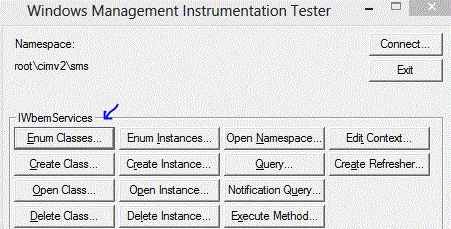
In order to find out why the query does not successfully finish, I have started wbemtest and connected to \\.\root\cimv2\sms and enumerate classes recursively:


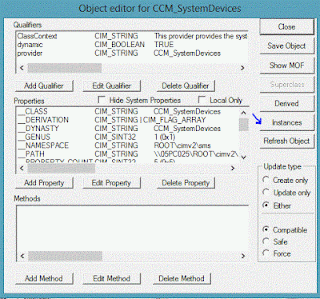
Find the CCM_SystemDevices from top level classes (double click):


Show Instances:


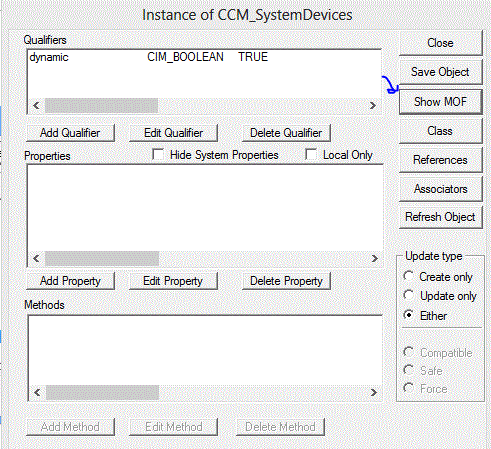
There was empty row with <no key> which was causing SCCM client Inventory Agent to fail:
 
 
Double click to see the properties, since everything is blank click on Show MOF:


MOF will show unprintable character \n "new line" in the name:

 
From the properties of the USB3.0 extensible Host Controller from device manager there was nothing suspicious:
 
 
I tried to update the driver, but there were no new versions to download. I have also checked Intel to download driver for USB 3.0 eXtensible Host Controller, but there were no new drivers for Windows 8, but there was a version of this driver for Windows 7. So, I have applied the not recommended way and applied Windows 7 drivers. Check http://plugable.com/2012/12/01/windows-8-and-intel-usb-3-0-host-controllers/ .
 
New version of the driver from Windows 7 looks like:


After installing Windows 7 version of the driver, SCCM 2007 Inventory Agent has successfully finished and reported to SCCM server.
 

Inernal Server Error for SCCM 2007 reports

I was experiencing Internal Server Error HTTP 500 (The website is under maintenance, The website has a programming error) when trying to run Computers with specific product report from SCCM 2007. The reason for this behavior is default IIS buffer for ASP responses limited to 4 MB. To check asp buffer limit use the following command:
cscript.exe adsutil.vbs GET w3svc/aspbufferinglimit

The output from the command looks like this (with default IIS settings):

 
To increase asp buffer size to 12 MB:
cscript.exe adsutil.vbs SET w3svc/aspbufferinglimit 12582912


After modifying IIS asp buffer setting I was able to display the report in my browser.


Error Event ID 11852 SMSClient

In my case XP client with installed Forefront Endpoint Protection 2010 client and SCCM 2007 client was notified that is not reporting to the configured FEP 2010 server. In the client's application event log there were error events with event id 11852 from smsclient source:

Failed to evaluate baseline content
1. Error executing discovery transform. The SDM model may be bad. Exception :System.Xml.Xsl.XslTransformException: An error occurred during a call to extension function 'query'. See InnerException for a complete description of the error. ---> System.TypeInitializationException: The type initializer for 'System.Management.MTAHelper' threw an exception. ---> System.Runtime.InteropServices.COMException (0x80131701): Retrieving the COM class factory for component with CLSID {A8F03BE3-EDB7-4972-821F-AF6F8EA34884} failed due to the following error: 80131701.
Also, in the client's system event log there were error events with event id 59,58 from SideBySide source:
Generate Activation Context failed for C:\WINDOWS\Microsoft.NET\Framework\v2.0.50727\WMINet_Utils.dll. Reference error message: The operation completed successfully.
and

Syntax error in manifest or policy file "C:\WINDOWS\Microsoft.NET\Framework\v2.0.50727\WMINet_Utils.dll" on line 0.

XP client had already installed framework 3.5 sp1. After repairing framework installation, fep 2010 client (SCCM) started reporting to fep2010 (SCCM) server and error events in event logs were gone.

The task sequence execution engine failed execution of a task sequence (Message ID 11141, 11170,11141)

In my case I was unable to deploy operating system (Windows 7) using SCCM 2007 OSD on machine (A) and following error events were logged :

The task sequence execution engine failed executing the action (Apply Operating System) in the group (Install Operating System) with the error code 2148077575
The task sequence execution engine failed execution of a task sequence. The operating system reported error 2148077575: The hash value is not correct.
The task sequence manager could not successfully complete execution of the task sequence. A failure exit code of 16389 was returned. The operating system reported error 2148077575: The hash value is not correct.
After refreshing package's distribution point, operating system was still failing to install with same errors logged. Since there were no changes on SCCM, since last successful deployment of the same Windows 7 image, I tried to install the same image on other box. Windows 7 was successfully deployed using same task sequence on machine (B). So, there was some problem with hardware on that machine (A). I've checked BIOS time settings and it was current. I've upgraded BIOS to latest version, and still no luck with OSD. Machine (A) had 2 memory modules (1GB each). After removing one memory module from slot, and leaving the machine with 1GB, task sequence completed successfully and Windows 7 was deployed. So, the problem with SCMM 2007 task sequenced OS deployment, was with faulty memory module on client machine (A).

SCCM server with SQL db installed was unable to register service principal name (spn)

In my case SCCM server with SQL server 2005 service running under local system (not recommended from SQL Server best practice) was unable to register it's spn in AD. Also, there is event for this behaviour in application log ID 26037 and source MSSQLSERVER :

The SQL Network Interface library could not register the Service Principal Name (SPN) for the SQL Server service. Error: 0x2098, state: 15. Failure to register an SPN may cause integrated authentication to fall back to NTLM instead of Kerberos. This is an informational message. Further action is only required if Kerberos authentication is required by authentication policies.

The reason for this behavior is that someone (or somehow) has removed permission from the computer account where SCCM and SQL were installed to register spn :


From the properties of the computer account you can see that permissions for Validated write to service principal name is missing. After allowing (setting) the permission for Validated write to service principal name, spn for the SQL server was successfully registered in AD.

You can't deploy OS on client in SCCM 2007 SP2

If you try to install OS to the same client within one hour from the previous deployment, the machine will fail to boot into PXE. To fix this change the (HKLM\Software\Microsoft\SMS\PXE\CacheExpire value to for example 120 (2 minutes), 0 is presumed 60 minutes. For more info please check http://support.microsoft.com/kb/2019640 .

How to check EMBG (Unique Master Citizen Number) using regex

In this post, I will share my implementation of how to check if some number looks like EMBG or Unique Master Citizen Number. For those of yo...